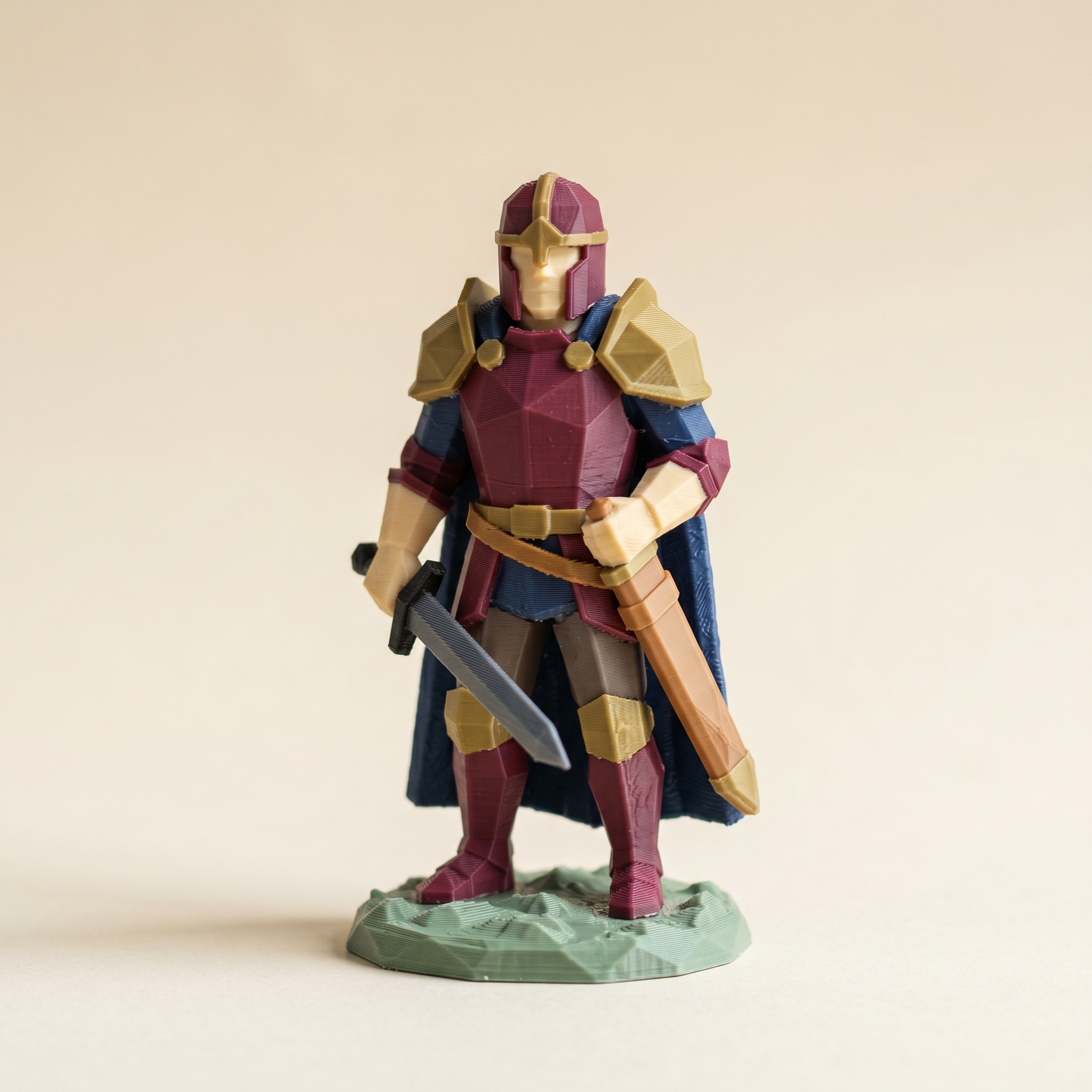
TL;DR: The H2C's Vortek hotend swap rack cuts purge waste per swap by about 58%, so the old advice to minimize swaps matters far less — the model becomes the constraint, not the spool count. Here's how to build a 7-color palette in Layerpaint, paint the regions, and read the swap bar correctly on a Bambu H2C.
What does the H2C's Vortek system change for multi-color printing?
The Bambu H2C uses the Vortek swap rack — six interchangeable hotends plus a fixed seventh — so instead of retracting and purging through one nozzle on every color change, it swaps the whole hotend. Bambu cites a 58% reduction in purge waste per swap versus a single-nozzle AMS print (the H2S and H2D get it via the Vortek Upgrade Kit). The cap is seven filaments, but the real change is the cost per swap, not the count.
The Bambu H2C ships with the Vortek hotend swap rack: six interchangeable hotends plus a fixed seventh on the left side, each preloaded with its own filament. Instead of retracting and purging through one nozzle on every color change, Bambu swaps the entire hot end. Bambu's stated number is a 58% reduction in purge waste per swap compared to a single-nozzle AMS print. The H2S and H2D get the same trick through the Vortek Upgrade Kit, which started shipping earlier this year.
The cap is seven filaments per print, but the meaningful change is the cost per swap, not the count. A swap that used to flush 200 mm³ of waste now flushes a fraction of that on the hot ends that live on the swap rack.
Why this rewrites the painted-3MF workflow
For two years the implicit advice in this blog has been to cut swaps. Reorder the palette, stop the brush at creases, paint by-height bands on a single extruder, skip Color Mixing on flat layers because it doubles the swap count. All of that advice was rooted in one fact: every swap costs filament.
On an H2C the limit moves. You can paint that fantasy knight in burgundy, brass, navy, cream, charcoal, tan, and sage and the slicer is no longer punishing you for it. The model becomes the constraint, not the spool count.
Building a 7-color palette in Layerpaint
Open the painter at layerpaint.app/app and drop in your STL, OBJ, or 3MF. The palette panel on the left starts with a small default. Click the + button to add chips. There is no soft cap at four or six. Keep going until the palette matches the seven hot ends you plan to load.
The order you add chips is the order Bambu Studio sees as slot 1 through slot 7. On the Bambu H2C the fixed left-side nozzle is slot 1, so put your support or background color in the first chip. The Vortek swap rack holds the next six. Remove a chip and Layerpaint unpaints every face that was assigned to it, so build the palette before you start painting.
The filament library is the easiest way to fill it. Click a chip, search by brand, and the chip carries the real-world hex. Bambu, Polymaker, Prusament, Overture, Sunlu, eSUN, Elegoo, Creality, and Hatchbox are all in there, plus Citadel and Vallejo paint references if you are matching a miniature scheme.
Painting the seven regions
Region tool first. Layerpaint auto-partitions on crease angle so an armor plate, a sword blade, a cloak, and a base usually fall out as separate clickable regions. Click each region, click the matching palette chip. A typical 7-color figure colors in under two minutes that way.
Where the auto-partition misses, the Wand floods a flat surface and stops at creases. The Brush handles the leftovers, with snap-to-crease for clean boundaries on organic shapes. The Crease tool lets you draw the boundary the model is missing, which helps on anime sculpts where the hairline is one smooth surface but you want two colors on it.
Set the Flush volume slider in the Slice panel before you read the swap bar. The default is 200 mm³ per swap, which matches a single-nozzle AMS. On a Vortek hot-end swap, Bambu's published numbers come in closer to 80 mm³. Drop the slider to 80 and the flush-waste estimate becomes realistic for an H2C print. The swap count itself does not change. Only the grams do.
Reading the swap bar on a Bambu H2C job
Toggle Show swap bar in the Slice panel. The bar at the left edge of the viewport reports total swaps and flush grams per layer. Amber is one swap. Red is two or more.
The bar reports the model, not the printer. It counts a swap regardless of whether the slicer will flush 200 mm³ or 80 mm³ to do it. So on a Bambu H2C job, read the swap count as a print-time signal (each swap still costs a few seconds for the hot-end change) and read the grams as flush waste at whatever flush volume you set. If the bar is still bright red across most layers, the print time will climb even if the waste does not.
The seventh nozzle and support
The fixed left nozzle on the Bambu H2C is a full-rate hotend, not part of the Vortek swap rack. Bambu's recommended use is a support filament or a single color that prints on every layer. In Layerpaint, paint as normal. Slot 1 is just another chip. Reassign it to the support role inside Bambu Studio when you import the 3MF. The painted region map stays intact.
Common questions
Does Vortek require a different file format from Layerpaint?
No. Layerpaint exports a Standard 3MF with the Materials Extension. The Bambu H2C reads it the same way an X1C or A1 does. Bambu Studio's Standard 3MF Color Parsing dialog maps each color group to a slot.
Can I paint more than 7 colors and just remove the extras?
You can, but removing a chip unpaints every face that was using it. If you paint with eight and trim down to seven later, those faces drop back to unpainted and the Region tool repaints them. Cleaner to build the seven you want up front.
What about the H2D without the Vortek upgrade?
Standard H2D is a dual-nozzle setup. The 7-filament workflow above does not apply. The H2D handles two filaments at full rate and routes the rest through an AMS, so the old swap-budget advice from the palette-order post still holds for those prints.
Try it now
Drop a model on layerpaint.app/app and add chips until the palette matches your loadout. The painter runs in the browser with no upload and no install. Your first Standard 3MF export is free; after that, $6.97 for 10 exports or $39.97 unlimited with no subscription.
Need to convert a 3MF to STL (or vice versa) first? Use our free converter — drag, preview, download. Works in your browser, nothing uploaded.