The best filament for miniatures on a Bambu AMS comes down to two parts: which material and finish to use, and which four colours to load. This guide is general guidance built on what the filament makers publish. It doesn't report test prints.
Best filament for miniatures: matte PLA in four colours from one line
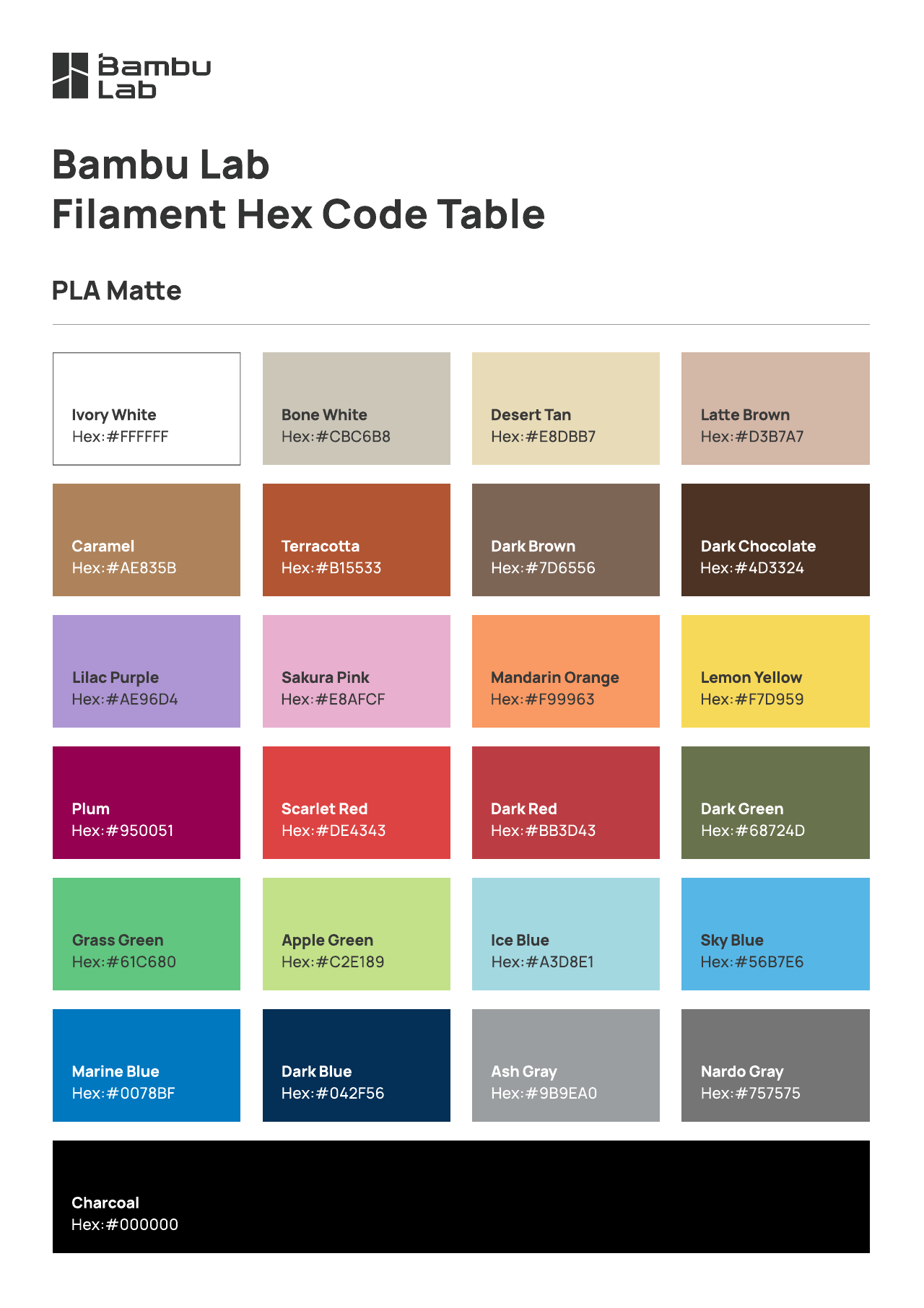
A good starting point is matte PLA, with all four AMS slots from the same line, so the finish matches across the figure. Bambu Lab says its PLA Matte "significantly reduces visible layer lines, offering a smooth, non-glossy appearance". It's sold as beginner-friendly and compatible with all AMS units, at an MSRP of $15.99 USD a roll in the US store (Bambu Lab US store, PLA Matte, checked 13 Oct 2026). Bambu also publishes the hex value of every PLA Matte colour, which makes palette planning exact.
General guidance: matte PLA vs PETG
When people ask about the best filament for miniatures versus PETG, this section is general guidance drawn from Bambu Lab's own product pages. It isn't a test.
- Finish. Bambu describes PLA Matte as reducing visible layer lines with a non-glossy look (PLA Matte). It describes PETG HF as having "a smooth texture and consistent gloss" (PETG HF). For a matte, painted look, the matte line matches what the maker claims.
- Handling. Bambu says PETG HF "must be dried before use", and to keep it dry during long prints. Its PLA Matte page also recommends drying before use for best quality, but sells the line as "Easy to Print & Beginner Friendly".
- Availability. Bambu lists PETG HF as discontinued and links to a newer PETG instead (US store, checked 13 Oct 2026). Check the current line before you buy.
- AMS. Both are listed as compatible with all AMS series, so you can use either in a 4-slot palette.
Matte vs silk on small details
The trade-off between finishes on painted multicolour prints is covered in matte vs silk filament for painted multicolour prints. Read that rather than a summary here.
Colour, not paint: printing minis in colour on a 4-slot AMS
Instead of printing grey and painting by hand, you can assign colours to regions of the model before you slice. The AMS then lays down skin, cloth, metal and base as it prints. The workflow is in how to paint miniatures by printing colour first and painting multicolour figures for the AMS.
With four slots, pick colours that are clearly different from each other. Got more colours than slots? See what to do with more colours than AMS slots.
Four ready palettes (4 slots, all Bambu PLA Matte)
If matte PLA is your pick for the best filament for miniatures, every colour below is a current Bambu PLA Matte colour, and the hex values are Bambu's own published codes (Bambu PLA Matte Hex Code PDF, checked 13 Oct 2026). Keeping to one line means the finish matches across the model. To swap in another brand, find the nearest real spool for a hex with our free filament colour matcher, or plan from scratch with plan a filament palette from hex colours.
1. Classic fantasy party
| Slot | Job | Filament | Hex (Bambu) |
|---|---|---|---|
| 1 | Skin | Bambu PLA Matte Latte Brown | #D3B7A7 |
| 2 | Cloth / tunic | Bambu PLA Matte Marine Blue | #0078BF |
| 3 | Armour / steel | Bambu PLA Matte Ash Gray | #9B9EA0 |
| 4 | Leather, hair, base | Bambu PLA Matte Dark Brown | #7D6556 |
2. Undead / necromancer
| Slot | Job | Filament | Hex (Bambu) |
|---|---|---|---|
| 1 | Bone | Bambu PLA Matte Bone White | #CBC6B8 |
| 2 | Robes | Bambu PLA Matte Plum | #950051 |
| 3 | Glow / accent | Bambu PLA Matte Apple Green | #C2E189 |
| 4 | Shadow / base | Bambu PLA Matte Charcoal | #000000 |
3. Dragon / monster
| Slot | Job | Filament | Hex (Bambu) |
|---|---|---|---|
| 1 | Main scales | Bambu PLA Matte Dark Red | #BB3D43 |
| 2 | Underbelly | Bambu PLA Matte Desert Tan | #E8DBB7 |
| 3 | Horns & claws | Bambu PLA Matte Ivory White | #FFFFFF |
| 4 | Eyes / base | Bambu PLA Matte Charcoal | #000000 |
4. Sci-fi / mech
| Slot | Job | Filament | Hex (Bambu) |
|---|---|---|---|
| 1 | Hull | Bambu PLA Matte Nardo Gray | #757575 |
| 2 | Panel accent | Bambu PLA Matte Mandarin Orange | #F99963 |
| 3 | Joints / dark metal | Bambu PLA Matte Dark Blue | #042F56 |
| 4 | Lights | Bambu PLA Matte Ice Blue | #A3D8E1 |
Avoiding the common multicolour-mini problems
- Dark showing through light. A light area over a dark core can look grey. See stop dark showing through light on painted 3MFs. This matters for Palette 2's Bone White over Charcoal.
- Specks of the wrong colour. See wrong-colour specks in a multicolour print.
- Tiny painted patches such as eyes and buckles. See detailer tool: recess walls vs flat tops.
From single-colour STL to painted 3MF
- Drop your STL into Layerpaint. It runs in the browser, and when you paint by hand the model never leaves your machine.
- Add your four palette colours in the order your AMS is loaded, slot 1 first. The library includes real Bambu, Polymaker, Prusament and Overture spools.
- Click a region with Magic Fill and it fills to the model's creases. Use the brush for small details, and Symmetry mirrors strokes on figures. Layerpaint flags patches too thin to print.
- Export a Standard 3MF. Bambu Studio's Standard 3MF colour-parsing dialog maps the colours to your AMS slots.
FAQ
PLA or PETG for minis?
For a matte look, the best filament for miniatures in Bambu's own line is PLA Matte, which its maker describes as reducing visible layer lines and calls beginner friendly. Bambu describes PETG HF as glossy and says it must be dried before use. See the general guidance above.
FDM or resin for miniatures?
This guide covers FDM only, so it doesn't rank the two. What FDM with an AMS can do that a single-material printer can't is print the mini in colour.
Do I need a 0.2 mm nozzle?
Not for anything in this guide. The palettes and the workflow don't depend on nozzle size.
Can I get multicolour STL files?
STL files carry no colour. You add colour yourself, in a painter or in your slicer, and export a 3MF that carries it.
Try it on your next mini
Pick a palette of the best filament for miniatures you can load today, then paint your next mini in Layerpaint. Painting is free, with no account, and your first hand-painted export is free.
Related: How to paint miniatures by printing colour first · Matte vs silk filament for painted multicolour prints · Multicolor D&D miniatures on Bambu AMS